On this page
- Why choose the genuine Brother WT-200CL waste toner box
- Waste toner box and toner
- Printers compatible with the WT-200CL
- Page yield
- Installation and maintenance
- Use and tips
- Specifications
- Related products
- Frequently asked questions
Why choose the genuine Brother WT-200CL waste toner box
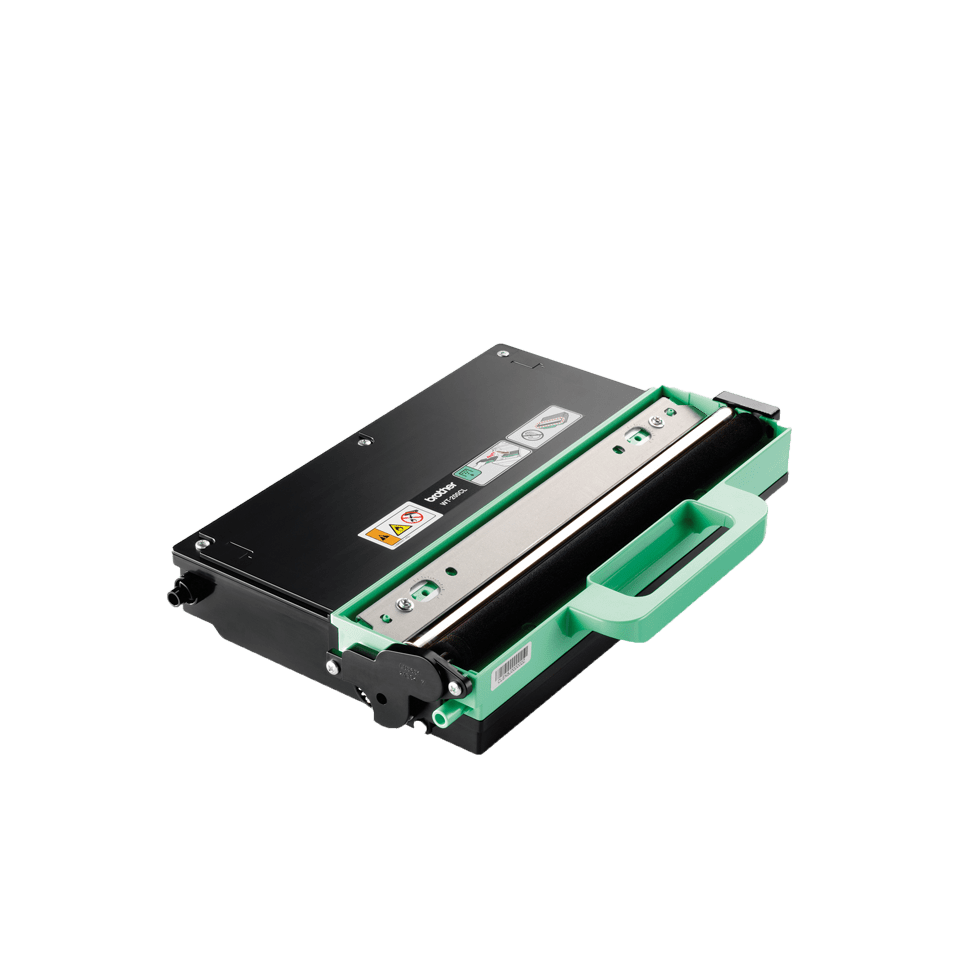
The WT-200CL is the genuine waste toner box of Brother HL-3000, DCP-9000 and MFC-9100/9300 color laser printers and all-in-ones. It collects the excess powder cleaned off the DR-230CL drum and the belt on every page. Rated for about 50,000 pages, it is replaced when the printer shows "Replace waste toner box"; a genuine box fits without leaks.
Waste toner box and toner
On every page the printer cleans the DR-230CL drum and the belt; the collected powder is stored in the WT-200CL box. It fills up in about 50,000 pages depending on coverage; heavy color prints fill it faster. The printer shows "Waste toner box almost full" then "Replace waste toner box" and stops until the box is replaced.
Printers compatible with the WT-200CL
The WT-200CL is compatible with 5 Brother models (manufacturer list):




Check the exact reference on the label at the back or underneath the printer; the suffixes (D, DW, DN, CDW) matter.
Page yield
About 50,000 pages according to the manufacturer, at 5% coverage. Heavily covered documents (photos, solid color areas) fill the box faster. Per page, the box cost is low; it is shown next to the price for comparison.
Installation and maintenance
Tool-free replacement: open the box cover (front or side depending on the model, see the printer guide), remove the full box without tilting it, insert the new WT-200CL, close; the printer resets the counter. The collected powder cannot be reused. Used Brother boxes can be returned free of charge through the Brother recycling program.
Use and tips
The WT-200CL box fills up in about 50,000 pages (over 4 years at 1,000 pages per month), faster with heavy color documents; the "Waste toner box almost full" message leaves time to order.
Keep the box in its packaging until installation and remove the full box without tilting or shaking it. The used box cannot be emptied or reused; the printer resets the counter after replacement.
Specifications
| Manufacturer part number | WT-200CL (WT200CL) |
|---|---|
| EAN code | 4977766667036 |
| Type | Genuine Brother waste toner box (OEM) |
| Technology | Color laser |
| Page yield | 50,000 pages (manufacturer data) |
| Matching drum unit | DR-230CL (about 15,000 pages) |
| Contents | 1 waste toner box |
| Net weight | 843 g |
| Product dimensions (L x W x H) | 282 x 152 x 370 mm |
| Origin | China |
| Compatible printers | 5 Brother HL, DCP, MFC models |
Related products
Frequently asked questions
Is the WT-200CL compatible with my Brother printer?
Yes if it appears in the list above (HL-3040CN to MFC-9320CW). If in doubt, compare the exact reference of your printer, suffix included.
When should the waste toner box be replaced?
When the printer shows "Replace waste toner box", about every 50,000 pages. The "almost full" message leaves time to order the WT-200CL.
Can the box be emptied and reused?
No. The box is sealed and the collected powder cannot be reused; the full box is replaced and recycled.
Can the printer run with a full box?
No. It stops until the box is replaced to avoid spilling toner inside.
Where can I find the safety data sheet (SDS) for the WT-200CL?
On our Brother support page: safety data sheet for the WT-200CL in your language, manuals and FAQ for the compatible printers.